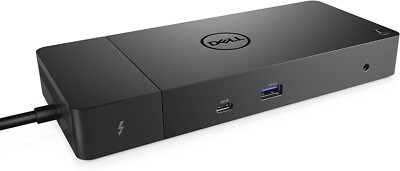
DELL WD19TB THUNDERBOLT DOCKING STATION (No AC adapter)
Take your productivity to the next level with the Dell WD19TB Thunderbolt Docking Station, perfect for business users! It offers reliability and compatibility without the need for a separate AC-Adapter.
Price Valid Until:
1970-01-01
The DELL WD19TB Thunderbolt Docking Station is the ideal solution for professionals looking for fast and reliable connectivity for their daily work. Designed to offer maximum flexibility, this docking station makes it easy to connect multiple devices, keeping your workspace organized and functional. Note: Product does not include a power supply (AC-Adapter).
- Reliable Thunderbolt technology for high data transfer speeds.
- Connectivity to multiple monitors for enhanced productivity.
- Compatible with a wide range of Dell and non-Dell devices.
- Stylish and compact design for seamless integration into any working environment.
Choose the DELL WD19TB Thunderbolt Docking Station to take your performance to the next level and simplify your daily work. Get it now and enjoy top-notch connectivity technology!
Only logged in customers who have purchased this product may leave a review.




 English
Reviews
There are no reviews yet