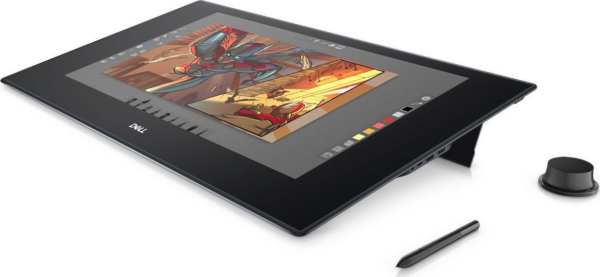
The Dell 27" (KV2718D) it is a interactive pen & touch display 27" that acts as a canvas on the desk: drawing/retouch, note-taking, 3D and creative workflows with touch and pen, as described in Dell's official specifications.
Situation: NEW OPEN BOX. Important: this particular piece is referred to as NO ACCESSORIES. If you need specific cables or accessories for use/connection, confirm what is included before purchase.
Practical guide to connection: A USB connection to the computer is required for the touch/pen features to work properly. The image can be passed through mini-HDMI, mini-DisplayPort ή USB-C (with DisplayPort over USB-C), depending on your system and available cables.
Why choose it: If you work long hours in creative applications, directly manipulating the image «on the canvas» can make sketching/retouch/annotation work more comfortable and faster, especially when you prefer a horizontal working position.
Official Dell sources: Dell Canvas Spec Sheet (KV2718D) - Quick Start Guide - Manuals & Documents
What is the Dell Canvas 27 (KV2718D) and who is it suitable for?;
According to the official Dell Spec Sheet, it's a 27″ (QHD) interactive pen & touch display for creative/design workflows and direct manipulation on the image (touch + pen + totems).
How does it connect to a computer? Do I need one or two cables?;
From the official specifications, video input can be via mini-HDMI, mini-DisplayPort or USB-C (with DisplayPort over USB-C). For touch/pen modes, a USB connection is also required. If your system supports USB-C with DisplayPort Alt Mode, a connection can be made more simply; otherwise a separate video (mini-HDMI/mini-DP) and USB connection will be required.
The product is listed as “No Accessories” - what does that mean in practice?;
It means that accessories/cables/pen/totem may not be included. Before purchasing, please check what is included in the specific piece or contact us for confirmation so that you can get what you need for use/connection.
With which operating system are the official system requirements listed?;
In the Dell Spec Sheet, the system requirements state Windows 10. For other operating systems, there is no official assurance from Dell in that document.
Where can I find official instructions for initial setup/connection?;
On the official Dell pages you will find the Quick Start Guide and additional manuals/documents (links on the product page).
Only logged in customers who have purchased this product may leave a review.





Reviews
There are no reviews yet