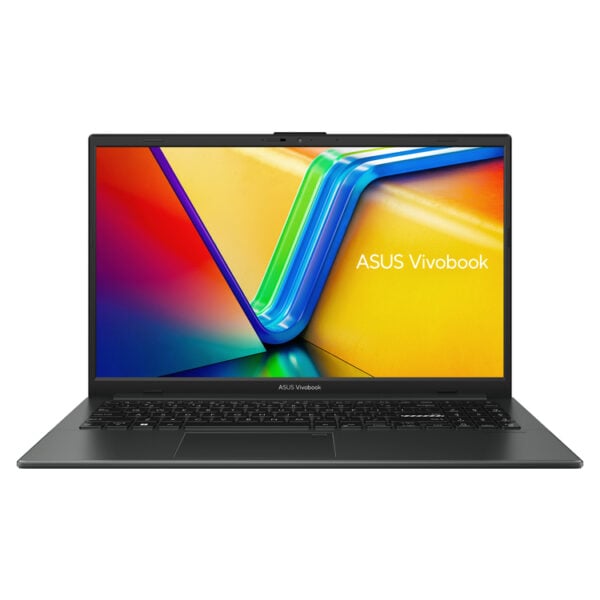
The ASUS Vivobook Go 15 E1504FA is a practical choice for users who want a 15.6-inch everyday laptop that strikes a balance between portability, a comfortable display, and fast responsiveness. The combination of a Ryzen 5 processor, 8GB of RAM, and a 256GB SSD makes it suitable for office applications, web browsing, video conferencing, e-learning, and basic multimedia use without unnecessary complexity.
The FHD IPS display makes text easier to read and provides a more comfortable viewing experience compared to standard panels, while the slim design of the Vivobook Go 15 series makes it easy to carry between home, the office, and school. The version without a pre-installed operating system offers flexibility for those who want to install their own desktop environment.
For technical documentation on this series, please refer to the official ASUS specifications: ASUS Vivobook Go 15 E1504F Technical Specifications.
Frequently Asked Questions (FAQs)
What is the ASUS Vivobook Go 15 E1504FA best suited for?;
It's perfect for everyday tasks such as Office, web browsing, email, video conferencing, online classes, and multimedia playback, with a comfortable 15.6-inch screen.
Is it suitable for students or for working from home?;
Yes, the combination of a Ryzen 5 processor, 8GB of RAM, and an SSD provides good performance for note-taking, homework, cloud applications, and frequent web browsing.
What does it mean that it has a 256GB SSD?;
The SSD helps the system and applications boot up quickly. The 256GB capacity is practical for documents, applications, and essential files, while large files can be stored externally or in the cloud.
Is an FHD IPS display useful for everyday use?;
Full HD resolution provides a crisp workspace, while the IPS panel helps deliver a more stable image and better viewing angles for reading, watching videos, and collaborating.
Does it come with an operating system preinstalled?;
This version is listed as "No OS," so it is intended for users or technicians who will install the operating system of their choice.
Which connections are useful for peripherals?;
The series supports standard ports such as USB-A, USB-C, HDMI, and an audio jack, allowing you to connect a mouse, external hard drive, monitor, headphones, or other everyday peripherals.
Only logged in customers who have purchased this product may leave a review.




Reviews
There are no reviews yet