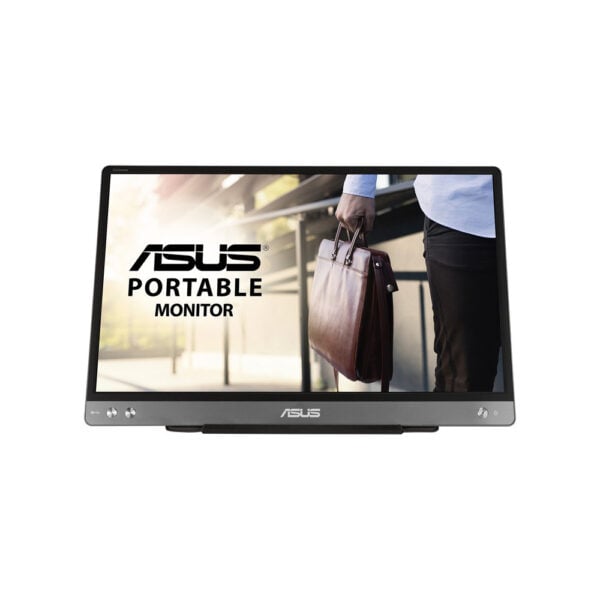
The ASUS ZenScreen MB14AC is a slim and lightweight 14″ portable monitor that instantly adds a second monitor to your laptop when you're in the office, at home or travelling. By IPS Full HD panels and Anti-glare surface, it's practical for documents, video conferencing, dashboards and presentations.
The connection is made with USB‑C (DP Alt Mode) for transferring video and power from one cable. If your computer does not support DP Alt Mode from USB-C, you can use a connection via USB‑A with driver installation (DisplayLink) for compatibility with more computers (mainly Windows).
The device has a socket 1/4″ for tripod and includes an ASUS Smart Case that doubles as a stand, so you can easily adjust the viewing angle to suit your setup.
Official sources: ASUS product page · ASUS technical characteristics · User manual (PDF)
Compatibility: USB-C requires a port with support for USB-C DisplayPort Alt Mode. USB-A requires DisplayLink driver (Windows).
Do you need a power supply?; It is usually powered by the same USB cable of the computer. The power required depends on the port and the system (host).
Does it work with USB-A?; Yes, via DisplayLink driver (especially on Windows), so it works on non-USB-C systems with DP Alt Mode.
What does the packaging include?; USB-C cable, quick start guide/warranty card and ASUS Smart Case (depending on region).
Can I put her on a tripod?; Yes, it has a 1/4″ socket for a tripod.
Only logged in customers who have purchased this product may leave a review.




Reviews
There are no reviews yet