DELL Alienware AW2725D 27″ QD-OLED 280Hz (QHD) — technical specifications & selection
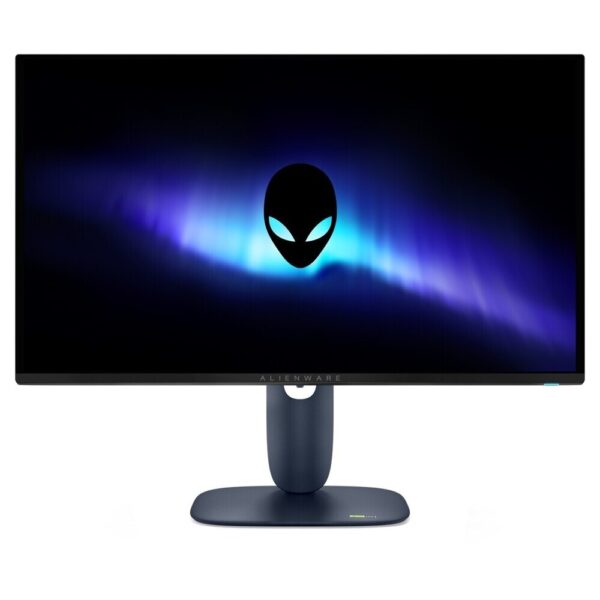
The Alienware AW2725D It is a 27″ screen with QD-OLED panel and analysis 2560 x 1440 (QHD), designed for users who want a very high refresh rate and top contrast for gaming as well as demanding everyday use. According to Dell's official specifications, it supports up to 280Hz and very fast response time (0.03ms GTG).
Why choose it?
- QD‑OLED image: very high contrast and deep black for movies, games and scenes with dark shots.
- QHD at 27″: balance between clarity and GPU requirements, with a comfortable workspace for multiple windows.
- 280Hz refresh: smooth movement in fast games and cleaner scrolling in desktop use.
- Adaptive Sync: support for VRR technologies for a more stable experience without tearing (depending on GPU/settings).
Verified technical specifications (official sources)
- Size / resolution: 26.7″ viewable, 2560 x 1440 (QHD), 16:9 aspect ratio.
- Panel: Quantum Dot OLED (QD-OLED).
- Refresh rate: up to 280Hz (maximum default 2560 x 1440 @ 280Hz).
- Response time: 0.03ms GTG.
- HDR: VESA DisplayHDR True Black 400.
- Brightness (typical): 250 cd/m² (with a peak reference of up to 1000 cd/m² in Dell specifications).
- Contrast (dynamic): 1,500,000:1.
- VESA: 100x100.
Ports & connectivity
Connectivity is crucial when you want to connect a PC, console, or laptop. Dell says of the AW2725D:
- 2x HDMI (support up to QHD 280Hz, HDR/VRR as defined in HDMI 2.1).
- 1x DisplayPort 1.4 (up to QHD 280Hz, HDR, DSC, VRR).
- USB hubs: USB Type‑B upstream, USB‑A downstream and USB‑C downstream (data) with charging capability up to 15W.
Practical selection guidance
- To take advantage of 280Hz: check that the GPU/system and cable (DP/HDMI) support QHD at 280Hz and enable the correct option in OSD/Windows.
- For HDR: enable HDR in the operating system/console and confirm the corresponding setting in the on-screen menu.
- For VRR (Adaptive Sync): enable G‑SYNC/FreeSync from drivers and display settings, depending on your hardware.
Official sources (Dell)
Frequently Asked Questions (FAQs)
What resolution and refresh rate does the AW2725D support?;
The AW2725D is QHD (2560 x 1440) and according to Dell's official specifications supports a refresh rate of up to 280Hz.
What ports does it have?;
According to Dell, it has 2x HDMI (HDMI 2.1, up to QHD 280Hz), 1x DisplayPort 1.4, USB Type‑B upstream, USB‑A downstream and USB‑C downstream (data) with charging capability up to 15W.
Does it support HDR and Adaptive Sync?;
Yes. Dell lists support for VESA DisplayHDR True Black 400 and variable refresh rate technologies such as NVIDIA G‑SYNC Compatible, AMD FreeSync Premium Pro, and VESA AdaptiveSync.
Is there VESA mounting and ergonomic adjustments?;
Yes. The official specifications list VESA 100 x 100 and ergonomic adjustments (height/tilt/swivel/pivot) via the stand.
Where can I find manuals and official support?;
You can view the official manuals/guides and support on Dell's AW2725D page: https://www.dell.com/support/product-details/en-us/product/aw2725d-monitor/resources/manuals
Only logged in customers who have purchased this product may leave a review.



Reviews
There are no reviews yet