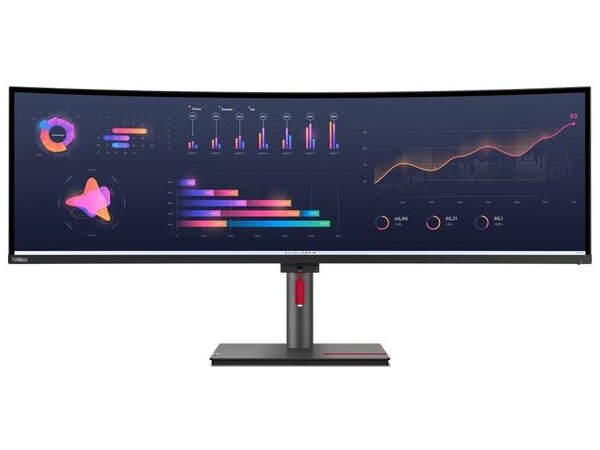
The Lenovo ThinkVision P49w-30 is a 49" super-ultrawide professional monitor that practically replaces two monitors, with a single panel and a ratio of 32:9. The analysis Dual QHD (5120 x 1440) offers ample space for multiple windows, spreadsheets, timelines, dashboards and simultaneous work on documents and applications.
Thanks to Thunderbolt™ 4 docking, you can connect a laptop with a cable for image/data and charging up to 100W, while you have access to RJ45 for fixed network and USB hub for peripherals. It also supports KVM and PIP/PBP for easy switching or simultaneous viewing of two devices.
For comfort during long hours of use, it has features such as Natural Low Blue Light and an ergonomic stand with adjustments, and includes speakers for basic use.
Official sources: Lenovo PSREF (ThinkVision P49w-30 Monitor) · Lenovo datasheet PDF
Can I connect it to a laptop via Thunderbolt/USB-C for video and charging?;
Yes. Features Thunderbolt™ 4 for video/data and up to 100W power supply (depending on device and configuration).
Does it support network (Ethernet) connection directly from the monitor?;
Yes. There is an RJ45 port (10/100/1000M) so you can have a wired network via docking setup.
What is KVM and how does it help in everyday work?;
KVM allows you to use one keyboard/mouse set for two devices (e.g. laptop + desktop) and easily switch between them.
Does it have Picture-in-Picture/Picture-by-Picture for two sources?;
Yes. Supports PIP/PBP so you can display two inputs at the same time and organize your work.
Can I put it on a VESA mount?;
Yes. Supports VESA 100×100 mm and 100×200 mm.
Only logged in customers who have purchased this product may leave a review.



Reviews
There are no reviews yet