Why choose the DS-730N
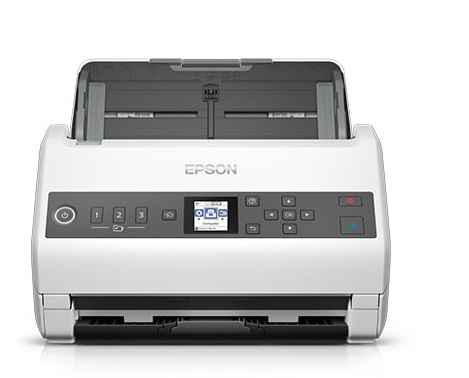
If you need reliable digitisation with easy network sharing, the DS-730N is ideal for everyday tasks such as filing, invoices/receipts, contracts, customer files and HR documents.
Scan & send with 1 tap
With the Quick Send buttons you can start scanning and send files to predefined destinations, reducing the steps for the user. In an office environment this means less time per task and a more consistent process.
Network use via Ethernet
The built-in Ethernet port helps with workgroup sharing and sending scans to network computers/folders, where supported by Epson's setup and software.
Compatibility & Software
TWAIN/ISIS drivers are supported for easier integration with existing applications. Software may require an Internet connection for download/installation.
Official sources
Epson product page (WorkForce DS-730N)
Epson specification sheet (PDF)
Can I scan and send files without opening an application on a computer?;
Yes. The DS-730N has Quick Send buttons with presets so you can start scanning and sending with one press (e.g. to email, network folder or other destinations per setting).
Does it support duplex scanning (both sides)?;
Yes. Supports 1-pass duplex scanning, so you can quickly digitize duplex documents.
Is it suitable for a multi-user office?;
Yes. It has a built-in Ethernet network connection for easy sharing in a workgroup and sending scans to computers/destinations on the network (with the right configuration).
What can I scan (documents/cards) and how is it powered?;
It features a 100-sheet Auto Document Feeder (ADF) for document stacks and supports business/ID card scanning, as well as long lengths at appropriate resolution.
What is the optical scan resolution?;
The optical resolution is 600 dpi (according to the official Epson specification sheet).
Only logged in customers who have purchased this product may leave a review.




Reviews
There are no reviews yet