Product condition: Refurbished Grade A. Fully functional, in excellent condition with minimal or no signs of use. Covered by a 2-year warranty.
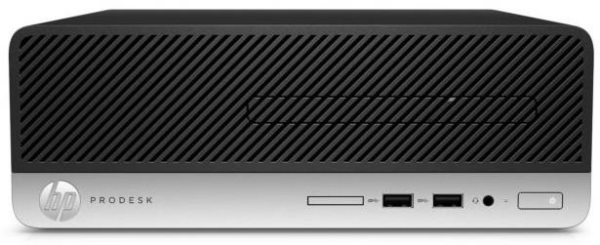
The HP ProDesk 400 G4 SFF It is a well-rounded choice for professionals who want a reliable desktop with a small footprint, without sacrificing the comfort of their daily work. The combination of Intel Core i5-6500, of the 8GB of RAM and the 256GB SSD It easily handles office applications, business software, multi-tab browsing, teleconferencing, and general business use.
The compact box small form factor It’s ideal for spaces where every centimeter counts, while remaining practical for connecting to monitors, printers, networks, and peripherals. If you’re looking for a professional system that integrates seamlessly into your daily office workflow and leaves room for future upgrades, this model is a clean and functional choice.
The existence DVD-RW This makes it even more convenient in business environments that continue to use older files or visual media, while the ProDesk series’ design remains focused on stability and easy integration into the workplace.
Official HP sources: specifications page and PDF datasheet.
Frequently Asked Questions (FAQs)
What is the HP ProDesk 400 G4 SFF best suited for?;
It is suitable for offices, accounting departments, back offices, telework, and general professional use where stability, a small footprint, and reliable day-to-day performance are essential.
What does Small Form Factor mean in practice?;
SFF means that the computer has a smaller case than a traditional tower, so it fits more easily on or under a desk without sacrificing its professional appearance or basic expandability.
Can I upgrade my memory or storage later?;
Yes. The platform is designed to accommodate future RAM or storage upgrades, which is helpful when you want to start with a balanced configuration and expand its capabilities later.
Does it have ports for connecting a monitor and peripherals?;
Yes. It features professional-grade connectivity for monitors and essential office peripherals, with ports such as DisplayPort, VGA, USB, and an RJ45 network port for easy integration into a corporate environment.
Is the DVD-RW still useful today?;
If you need to read or write to older optical media, the DVD-RW remains a practical option. For environments that work with files, backups, or older media, it’s a useful addition.
Only logged in customers who have purchased this product may leave a review.




Reviews
There are no reviews yet