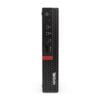
The Lenovo ThinkCentre M720Q Tiny it is a mini PC (1L) which is ideally suited to an office, cash register/POS, educational environment or home office, when you want a "tied" professional system in a minimum of space. This specific composition concerns Intel Core i5-8400T, 8GB RAM and 256GB SSD (as stated in the product title).
For confirmed information about the series/chassis (dimensions, weight, port options and expansion capabilities), see the official Lenovo PSREF (HTML) or the PSREF PDF. For Lenovo guides, manuals and drivers, use the official pages. Guides & Manuals and Drivers & Software.
Who is it a good choice for?
- Professional use: office applications, ERP/CRM, teleworking, web tools.
- Small space workstation: under a screen, in a rack/cabinet or behind a monitor with VESA (where supported).
- Stability/Convenience: when you prefer desktop reliability, without the bulk.
Compatibility & connection
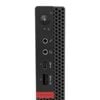
- Monitors: Video output may vary by configuration (DisplayPort/HDMI/VGA or optional ports). Please check the available ports on the device you will receive and see the official options on PSREF.
- Wi-Fi/BT: Several configurations have a WLAN slot. If you need a wireless connection, confirm that an appropriate module is included.
- Upgrades: The series supports expansion/storage options (e.g. M.2/2.5" per case). For safe compatibility, rely on PSREF and manuals.
Useful tips before buying
- If you want dual screen, confirm that the video outputs meet your needs (type/number of ports).
- If he will enter behind a screen, check that a VESA kit/bracket is available (where required).
- For corporate environment, use official drivers from Lenovo for stability/security.
FAQ
- Are the ports (HDMI/DP/VGA) the same on all M720Q Tiny?;
- Not always. The series supports different configurations and optional ports. For official options, please refer to Lenovo's PSREF and confirm the ports of the device you will receive.
- Where can I find drivers and manuals?;
- On Lenovo's official support pages: Guides & Manuals and Drivers & Software (links above).
- Can I place the mini PC behind a monitor?;
- In many scenarios this is done with a VESA mount kit, depending on the configuration. See the official options on PSREF.
- Is it suitable for professional/office use?;
- Yes — it is designed for commercial use (ThinkCentre series), with an emphasis on reliability and easy driver/update management through Lenovo support.
- What should I check for monitor/docking compatibility?;
- Check the type/number of video ports (HDMI/DP/VGA) and the resolution/Hz you want. For general series capabilities, see PSREF.
Only logged in customers who have purchased this product may leave a review.










Reviews
There are no reviews yet