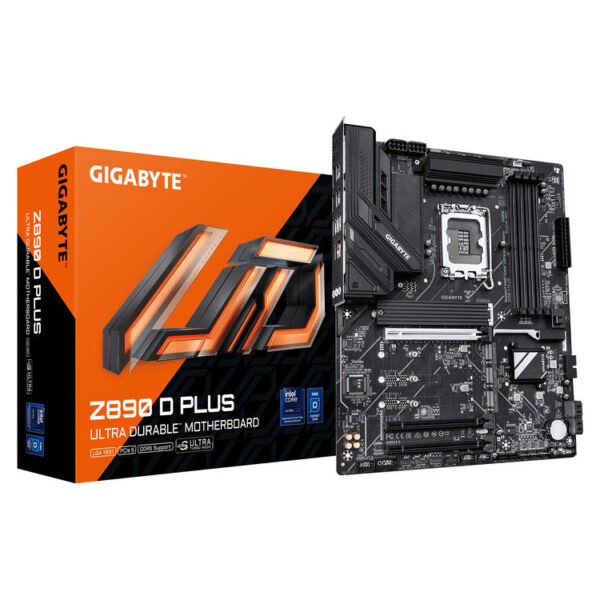
Gigabyte Z890 D PLUS ATX motherboard for Intel LGA1851
The Gigabyte Z890 D PLUS is a modern motherboard aimed at those who want to set up a new Intel build or upgrade platform, with DDR5 memories and capabilities of the series Intel Z890. It's a balanced choice when you want reliability, good scalability and a «clean» base for a graphics card and fast NVMe storage.
Who is it suitable for?
- For gaming PC with an emphasis on stability.
- For content creation and multitasking where you want modern platform.
- For build you need to easily upgraded (e.g. additional storage/regional future).
Compatibility & practical advice before buying
- CPU: Confirm that your processor is for LGA1851 and that the cooler/base is compatible with the socket.
- RAM: Use DDR5 kit and follow the suggested DIMM locations in the manual for proper dual-channel.
- Box: You need a box that supports ATX.
- BIOS/Drivers: After setup, download the latest files from the official GIGABYTE Support for maximum stability.
Official sources
What processors is the Gigabyte Z890 D PLUS compatible with?;
The motherboard has LGA1851 socket, so it is suitable for processors that support that socket. For the latest list, check the official support page: https://www.gigabyte.com/Motherboard/Z890-D-PLUS/support
What memories do I need?;
Supports DDR5. For best stability, prefer kit and follow the suggested installation locations mentioned in the user manual.
Does it fit in every box?;
It is native ATX, so you need a box that supports ATX. If you have a mATX/ITX box, it is not suitable.
Where can I find drivers, BIOS and installation instructions?;
The official GIGABYTE Support site has drivers/BIOS, while the manual (PDF) has instructions for installation and connections.
What should I look out for on the first boot?;
Use DDR5 kits in the correct DIMM positions, check that the ATX/CPU power cables are plugged in and follow the instructions in the manual. In case of emergency, update BIOS from official Support.
Only logged in customers who have purchased this product may leave a review.







Reviews
There are no reviews yet