Product condition: Refurbished Grade A. Fully functional, in excellent condition with minimal or no signs of use. Covered by a 2-year warranty.
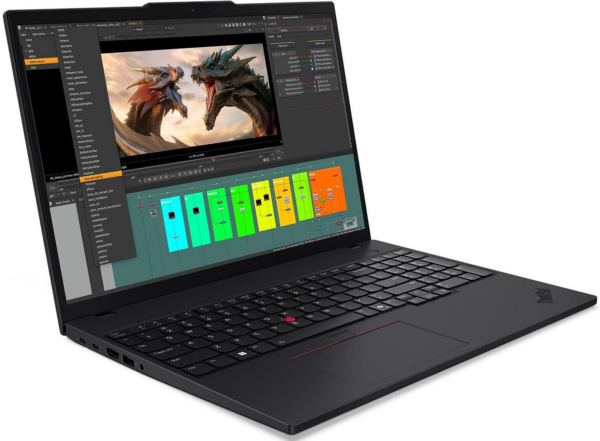
The Lenovo ThinkPad P16s Gen 4 Ryzen AI 9 32GB 1TB is a professional laptop designed for demanding daily work, multitasking, and creative applications. The combination of the AMD Ryzen AI 9 HX PRO 370, 32GB of RAM, and 1TB of NVMe storage ensures fast performance when handling large files, multiple windows, video conferences, and productivity tools.
The 16-inch display with a resolution of 3840 x 2400 pixels offers a large workspace for spreadsheets, content editing, and viewing multiple applications side by side. The integrated Radeon 890M handles professional graphics tasks and everyday creative work, while Wi-Fi 7, Bluetooth 5.4, and the RJ45 port help ensure a stable connection in the office or in a docking environment.
For technical confirmation, please see the Lenovo PSREF official page for the ThinkPad P16s Gen 4 AMD and the Lenovo PSREF Official Technical Specifications Sheet.
Frequently Asked Questions (FAQs)
Who is the Lenovo ThinkPad P16s Gen 4 Ryzen AI 9 32GB 1TB best suited for?;
It's ideal for professionals who need a powerful laptop for multitasking, large files, office applications, creative work, and consistent performance in everyday use.
What does the Ryzen AI 9 HX PRO 370 actually offer?;
The processor delivers high performance for demanding tasks and features built-in AI capabilities, enabling the system to better handle modern professional applications.
Is 32GB of RAM and 1TB of NVMe storage enough for professional use?;
Yes, the 32GB of RAM makes it easy to run multiple applications at the same time, while the 1TB NVMe drive provides fast access and plenty of storage space for projects, documents, and multimedia files.
What does a 16-inch screen with a resolution of 3840 x 2400 pixels mean?;
It offers a very clear display and a large workspace, which is useful for content editing, spreadsheets, presentations, and viewing multiple windows side by side.
Can it be easily connected to a computer with peripherals?;
Yes, it features Thunderbolt 4, HDMI, USB 3.2, RJ45, Wi-Fi 7, and Bluetooth 5.4, so it can connect to displays, docking stations, networks, and wireless peripherals.
What should I keep in mind when choosing an operating system?;
The available operating system options must be selected from the product variant field so that the final configuration matches your intended use and work environment.
Only logged in customers who have purchased this product may leave a review.



Reviews
There are no reviews yet